Don't paste your press release into a social post. Publish the full release where journalists and search engines can find it, then cut it into short, platform-native posts that each carry one clear point and a link back. On LinkedIn, that usually means posting through a founder or executive as well as the company page.
This guide shows how to do that step by step. It covers adapting a release for each platform, posting it on LinkedIn, deciding what goes in the post, and using social sharing to win more coverage.
TL;DR
- Treat the release and the social post as two different pieces of writing. The release is the full record, and the post is a hook and a link.
- Keep the core message the same everywhere, but adjust the length, tone, hashtags and image for each platform.
- On LinkedIn, share through a founder or executive and ask staff to add their own comments, because personal voices tend to outperform company pages.
- Finish with one call to action, a few relevant hashtags, and a link to the full release.
- When a journalist covers you, share that coverage too and tag the writer.
Table of Contents
- Why the release and the post are different jobs
- Publish the release first
- Break the release into pieces
- What a good post includes
- How to post a press release on LinkedIn
- Share through people, not only the company page
- Adapting for each platform
- Is a press release earned media?
- Use social sharing to win coverage
- A simple posting schedule
- Common mistakes
- Publish the release with News Today
- FAQ
- Sources
Why the release and the post are different jobs
A press release is written for journalists and for anyone searching later. It follows a set order: headline, summary paragraph, detail, quote, background and contact. A social post is read in a feed, in a second or two, by someone who wasn't looking for your news.
That difference explains most of what goes wrong. A business copies the first three paragraphs of its release into a post, adds a link and wonders why nobody reacts. The text is fine for a newsroom and wrong for a feed.
Australian PR agency Adoni Media makes the same point: keep the core message consistent but adapt language, caption length, hashtags, tone and imagery to each platform's audience and conventions. The facts stay fixed. The packaging changes.
It also helps to separate two things that people often blur together:
- The release itself lives at a stable web address. It is the page a journalist cites and the page that can still be found in search a year from now.
- The social posts are short-lived pointers to that page. They create a spike of attention in the days after the announcement.
If you only have social posts, you have nothing a reporter can quote from or link to. If you only have the release, you are relying on journalists to find it unaided. You need both.
Publish the release first
Sequence matters. Post to social media after the release is live, not before, so every post can link to a finished page. It also keeps your announcement's wording consistent, because the release becomes the single source that every post draws from.
Before you publish, check the release for the things that cause embarrassing corrections later: dates, names, figures and the exact scope of the announcement. Fixing a mistake is far harder once ten posts quote it. If something does slip through, our guide on fixing an error after publishing explains how to handle it cleanly.
If you're still working out how to get the release to media in the first place, how to send a media release in Australia covers the basics of who to send it to and how.
Break the release into pieces
A practical way to avoid copying the release is to take it apart. Highlightly's 2026 repurposing framework suggests splitting the release into news, proof, spokesperson voice, timeline and audience action, then writing platform-native versions while keeping the announcement's exact scope, timing and conditions intact.
Here is how that looks for a fictional example: a Brisbane accounting software startup announcing a new invoicing feature.
| Piece | What it contains | Social post it becomes |
|---|---|---|
| News | The feature launches and who it's for | The announcement post with a link |
| Proof | A figure from beta testing, or a customer result | A short follow-up post with one number |
| Spokesperson voice | The founder's quote from the release | A first-person post from the founder |
| Timeline | When it's available and any rollout stages | A reminder post nearer to launch |
| Audience action | Sign up, book a demo, read the full release | The call to action in every post |
Prowly's guide to social media press releases makes a similar recommendation: share only the most important points, or use several posts to highlight different aspects of the announcement. One release can feed a week of posts without repeating itself.
Keep one rule while you split things up: don't let the posts drift from the release. If the release says the feature is available to Australian customers from launch, a post shouldn't imply worldwide availability. Short posts invite exaggeration, so check each one against the source.
What a good post includes
The NSW Government's social media guidelines are a useful benchmark because they're written for public audiences who skim. Its advice is to open with a short, attention-grabbing line, keep copy concise and scannable, use plain language and active voice, finish with one clear call to action, and use around three to five relevant hashtags where appropriate.
Applied to a press release, that gives you a simple template:
- A hook. Lead with the news or the most surprising fact, not your company name. Compare 'We are thrilled to announce' with 'Invoices now reconcile themselves'.
- The facts that matter most. One or two details a reader needs to understand why it's relevant to them.
- A visual. A product shot, a photo of the founder, a short video, or a simple graphic with one figure. Prowly's guide recommends suitable graphics or video and a link to a relevant page such as the product page or newsroom story.
- One call to action. Read the release, book a demo, register. Not three of them.
- A few hashtags. Pick those your audience actually follows, rather than stacking generic ones.
The NSW guidance also stresses accessibility: short sentences, inclusive wording and a single specific action make copy easier to understand and act on. That matters for a business too, because the people who see your post are rarely the people who already know your industry's jargon.
A before and after
Here's the opening of a typical release, followed by how it could read as a post.
Release opening: 'Melbourne-based logistics company ExampleCo today announced the launch of a new same-day delivery service covering the inner-city postcodes, following a successful six-week pilot.'
LinkedIn post: 'Same-day delivery across inner Melbourne starts this week. We tested it for six weeks before opening it to everyone. Here's what we learned, and how to book your first run. Full details in the link below.'
The post drops the formal framing, keeps the facts, and ends by pointing somewhere. The name ExampleCo is invented for illustration, so don't read it as a real case.
How to post a press release on LinkedIn
LinkedIn is the platform most B2B announcements belong on, and the mechanics are simple. According to Business Insider's walkthrough, you open the homepage, click Start a Post, write your content and add a link or image, choose your audience settings, then click Post.
The harder decision is which format to use.
Post, article or link
- A standard post suits most announcements. It's short, gets seen in the feed, and can link to the full release.
- A LinkedIn Article suits a longer announcement. Press Release Zen notes that articles allow full formatting, embedded media and permanent visibility on a profile. Use one when you want the whole story to live on LinkedIn, not just a teaser.
- A link to your release keeps the authoritative version on your own site or distribution page, which is better for search and for journalists.
For most businesses, the best combination is a short post that links to the published release. Keep the full text off LinkedIn unless you have a reason to put it there, so you don't split attention between two versions.
The link question
Press Release Zen also reports that LinkedIn's algorithm may penalise posts with external links, which is why placing the link in the first comment is a common workaround. Treat this as a tactic to test, not a rule: platforms change how they handle links, and the effect varies by account. Try the link in the post for one announcement and in a comment for the next, then compare how many people reach the release.
Share through people, not only the company page
This is where many Australian businesses leave reach on the table. A company page has a modest following and little personality. A founder or executive has a network of real contacts and a voice people respond to.
Hardman Communications, an Australian agency, reported that LinkedIn news shared by CEOs or executives had a viral action rate almost four times that of company-page posts. That is one agency's reported figure rather than a guarantee, but it supports a sensible habit: for relevant announcements, let a human tell the story in the first person.
Press Release Zen reaches the same conclusion, prioritising posts through key individuals like a CEO or founder because personal profiles often achieve higher organic reach than company pages. It also recommends encouraging employees to share the news within their own networks.
Regen Strategic, another Australian agency, makes the same case for staff: employees who share company news and add their own insights extend visibility through their networks.
A workable approach looks like this:
- The company page posts the announcement first, with the link to the release.
- The founder or relevant executive posts their own version the same day, with a personal angle: why they built it, what surprised them.
- Team members get a short note with the link, the key facts and permission to share it in their own words.
Never script staff posts word for word. Identical posts from twenty accounts read as an instruction from head office, and they undercut the reason you asked in the first place. Give people the facts and let them choose the phrasing.
Adapting for each platform
You don't need to be everywhere. Pick the two or three platforms where your audience pays attention. Adoni Media's advice to adapt language, caption length, hashtags, tone and imagery applies to each of them, and here is a rough guide to what that means in practice.
| Platform | Best suited to | How to adapt the release |
|---|---|---|
| B2B news, hires, funding, partnerships, awards | Professional but human tone, first-person from a founder, short paragraphs | |
| Local businesses, community news, events, nonprofits | Warmer tone, a strong photo, a clear local angle | |
| Product launches, visual stories | Image or video first, caption second, link in bio or story | |
| X | Fast updates, journalist and industry conversation | One tight sentence, a link, tag relevant accounts |
This table is a guide drawn from general practice, not a rule. Your own analytics will show where your audience responds.
A nonprofit announcing a new program, for example, will often do better on Facebook with a photo of the people involved than on LinkedIn with a formal summary. A software company announcing a partnership will usually do the opposite.
Is a press release earned media?
People often ask this, and the honest answer is: partly. The release itself is something you write and publish, so it sits closer to owned media. Coverage that results from it is earned, because a journalist chose to write about you. Shares of that coverage by your own audience fall under shared media.
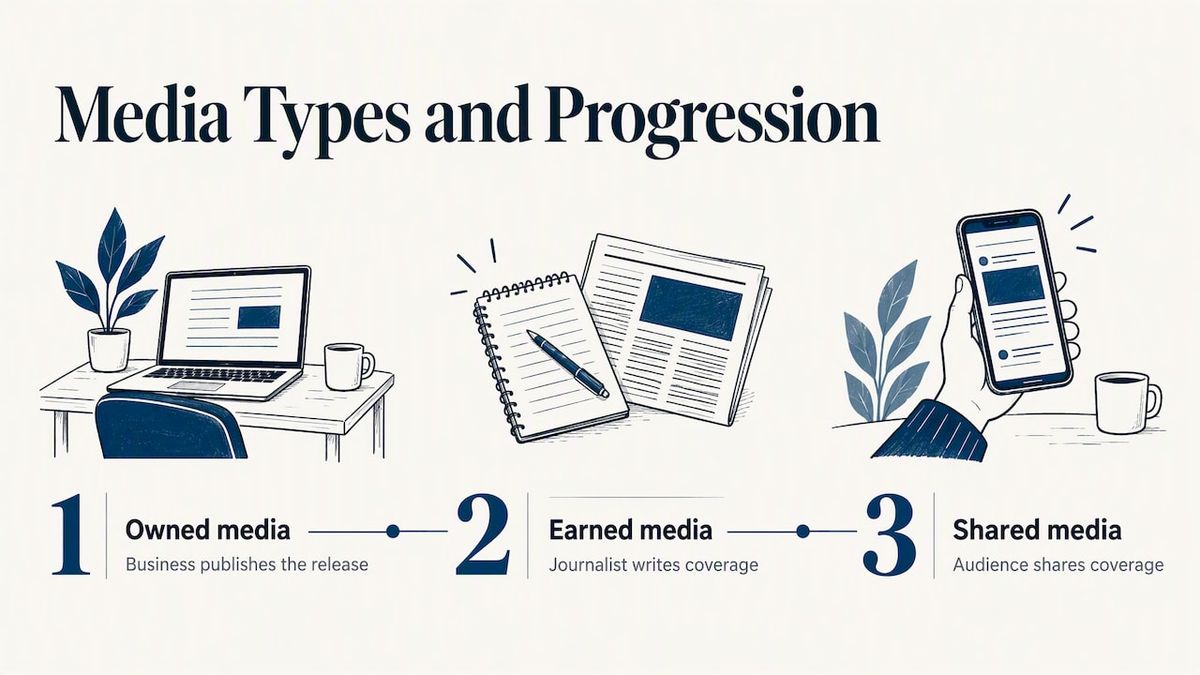
That distinction matters for how you report results. Counting a published release as earned coverage overstates your results. Counting the articles, mentions and links that journalists produce because of it is a fairer measure. Our guide to earned media metrics and how to report them explains what to track.
Use social sharing to win coverage
Social media works in both directions. It spreads your release, and it also puts your news in front of journalists who follow your industry.
Regen Strategic notes that sharing media coverage on social extends it beyond the outlet's audience, builds credibility, and can attract journalists' attention for future stories. It also advises tagging the journalist when you share, which helps build the relationship.
In practice:
- Follow the reporters and outlets that cover your sector, and engage with their work before you need anything from them.
- When a story about you runs, share it the same day with a short thank-you and the key takeaway.
- Tag the journalist and the outlet, but don't pressure them to reshare.
- Keep a record of who covered what, so your next pitch can refer to it.
To see where your announcement ended up, monitoring brand mentions helps you find coverage you didn't know about, so you can share it too.
A simple posting schedule
One announcement can support several posts without feeling repetitive. A reasonable pattern for a product or service launch:
- Day of release: the main announcement from the company page and the founder, linking to the release.
- Day two or three: a proof post using one figure, customer result or behind-the-scenes photo.
- Within the week: a spokesperson post that pulls out the quote from the release.
- When coverage lands: a share of the article with a tag to the journalist.
- Nearer to any launch date: a reminder with the audience action.
If your announcement is a product launch, our guide to a press release for an app launch shows how to build the release those posts depend on.
Common mistakes
- Pasting the whole release. It's too long and written for the wrong reader.
- Posting before the release is live. You have nothing to link to.
- Using the same text on every platform. Followers see the repetition, and each platform's conventions are ignored.
- Too many hashtags. Three to five relevant ones are enough.
- Several calls to action. A reader who has to choose usually doesn't act.
- Drifting from the facts. Check every post against the release for dates, names, figures and conditions.
- Ignoring the replies. Answer comments quickly, particularly in the first hours.
Publish the release with News Today
The social posts only work if there is a solid release behind them. With News Today, you submit your release, it goes through editorial review, and it is published and syndicated to journalists, media outlets and online readers. Our editorial standards are there to keep releases credible and accurate, and we offer instant publication or a 24 to 48 hour review.
A single release costs $39, one-off. Agencies, frequent publishers and enterprise teams can ask about custom packages on the pricing page.
When your release is ready, you can submit your press release and use the published link in every post you write.
FAQ
Should I post my whole press release on social media?
No. Publish the full release on a page that journalists and search engines can reach, then post a short hook with a link. Use several posts to cover different angles instead of one long copy. LinkedIn Articles are the exception if you want the full text to live on your profile.
How do I share a press release on LinkedIn?
Click Start a Post on your homepage, write a short hook, add the link or an image, choose your audience and click Post. Ask a founder or executive to post their own version as well, since personal profiles often get more reach than company pages. If you test the link in a comment instead, compare the results across a few announcements.
How many hashtags should I use?
NSW Government guidance suggests around three to five relevant hashtags where appropriate. Choose those that your audience follows rather than broad tags. More isn't better, and a long string of tags makes a post harder to read.
Is a press release earned media?
Not by itself. You write and publish the release, so it is closer to owned media. The coverage journalists write because of it is earned media, and your audience's shares of that coverage count as shared media.
Sources
- How PR Professionals can use social media | Adoni Media
- Social Media Press Release Guide | Prowly
- Social media copy | NSW Government
- How to Post on LinkedIn to Share News With Your Network | Business Insider
- How to Post a Press Release on LinkedIn | Press Release Zen
- LinkedIn levelling up | Hardman Communications
- Amplify your media results with social media | Regen Strategic
- How to Turn a Press Release into Social Media Content | Highlightly